Customers don't know when their order will arrive
- Cart abandonment
- Repetittive support questions
- Lost customer trust
Uncertainty kills conversions
Delivery dates, free-shipping progress bars, A/B testing, and scheduled banners—designed for every storefront moment.
Uncertainty kills conversions
Clarity builds confidence
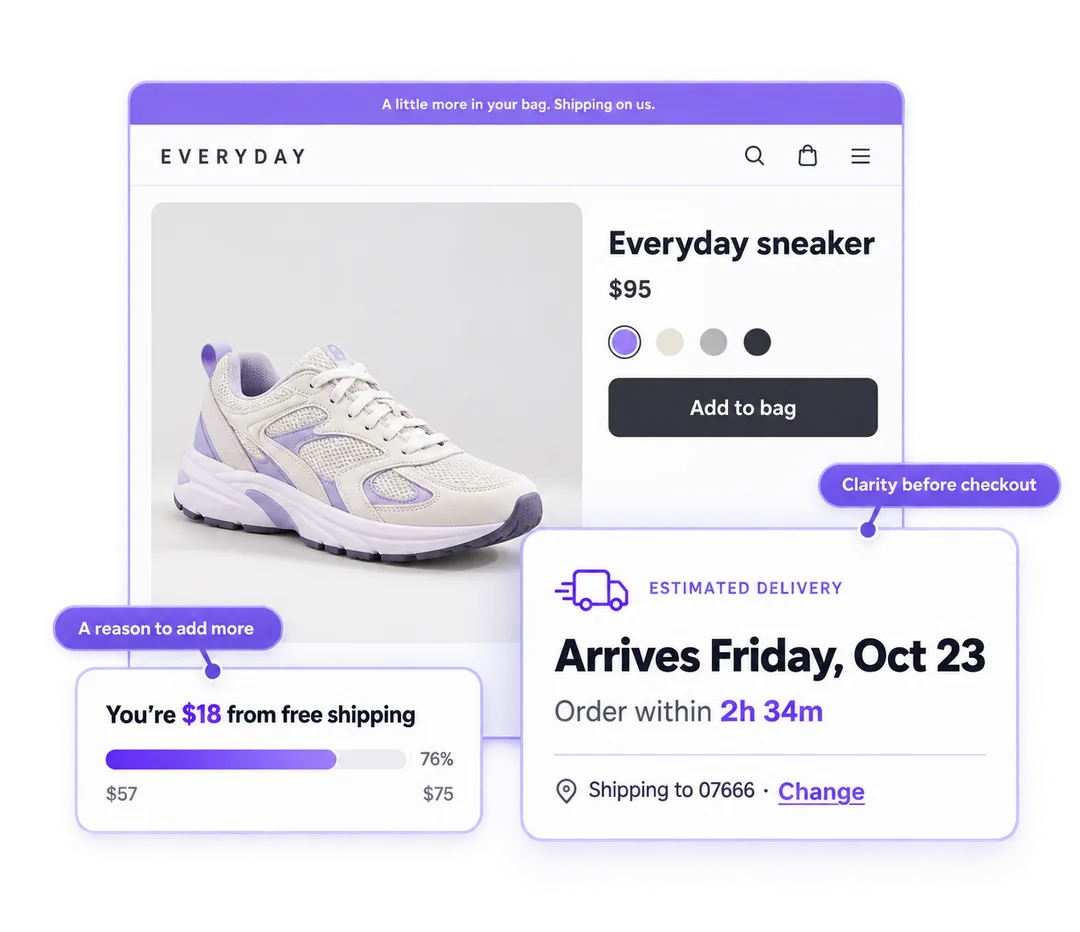
Reinforce delivery expectations at key decision points throughout checkout.
Delivery dates update automatically, so shoppers always see accurate information.
Style banners and badges to fit seamlessly into your storefront design.
Show shoppers how close they are to unlocking free shipping, alongside promotions and delivery dates.
GetByDate fits seamlessly into your store and workflow. Create delivery banners, simple announcements, and scheduled campaigns across key storefront touchpoints without adding complexity.
Learn how it worksClear delivery dates reduce uncertainty and help shoppers complete their purchase

Clear delivery timelines reduce hesitation and turn more visits into purchases.
Show accurate delivery dates before checkout to prevent surprises

Fewer “where is my order” messages for your team.
Get up and running in minutes
Add the app from the Shopify App Store, then open GetByDate in your Shopify admin.
Select a banner type, layout, schedule, and style that matches your brand. Configure messaging and display rules in the app.
Add banners and badges in the Shopify Theme Editor, then publish your changes.
Setup takes minutes. No technical experience required.
Install on ShopifyDelightify is a team of ecommerce enthusiasts and problem-solvers who believe shopping should be simple, predictable, and enjoyable for both merchants and customers. We build tools that help online stores communicate clearly with shoppers, reduce confusion, and increase confidence at every step of the buying journey.
Improving clarity, confidence, and conversions for ecommerce merchants.
This app lets you show customers exactly when they can expect their purchase to arrive. By displaying clear delivery date estimates throughout your store, you set expectations upfront and improve the overall customer experience.
This app is built for merchants of all sizes who want to improve customer confidence and reduce uncertainty around delivery timelines. It’s ideal for stores that want to proactively keep customers informed before they place an order.
Delivery dates are calculated using your store’s order volume and fulfillment patterns to provide realistic, store-specific delivery expectations.
Delivery date banners and widgets can be added to key areas of your storefront, such as:
All placements are designed to be clear, helpful, and unobtrusive.
Setup is fast and requires no code.
Most merchants can complete setup in just a few minutes.
Yes. The app works with most modern Shopify themes. If you run into any theme-specific issues, our support team is happy to help.
No. The app is lightweight and optimized to avoid impacting storefront performance or page load times.
No. This app does not collect or store any customer data.
GetByDate offers four monthly plans. Each plan includes the capabilities of the plans below it:
Pricing is based on the plan you choose, not on monthly order volume.
No credit card is required to activate the Free plan. Paid plans use Shopify billing and require approval before charges begin.
Yes. By clearly communicating delivery expectations upfront, many merchants see fewer "Where is my order?" questions and improved customer satisfaction.
Support is available at support@getbydate.com. We’re happy to help with any questions or technical issues.
Our team is ready to help you set up Get By Date and improve your customers' delivery experience.
Contact supportYou can also reach us at info@delightify.co.
Our offices support teams across the United States. Get By Date works remotely to help Shopify merchants provide clear delivery expectations and real-time order updates to their customers.
Response time: We typically reply within 24 business hours, Monday to Friday. Our goal is to resolve your issue as quickly as possible so you can focus on running your store.